Grit Framework vs Electron vs Tauri — The Best Way to Build Production Desktop Apps in 2026
Electron is heavy, Tauri is low-level, and most teams don't want to roll their own auth, RBAC and admin panel. Here's how the Grit Framework (Wails + Go + React + batteries) compares head-to-head with Electron and Tauri for production desktop apps in 2026.
Grit Framework vs Electron vs Tauri — The Best Way to Build Production Desktop Apps in 2026
Pick any "build a desktop app with web tech" thread on Hacker News and you'll see the same three names: Electron, Tauri, and lately Wails. They all solve the same surface-level problem (render HTML/JS inside a native window), but the moment you try to ship a real production business application — with login, roles, audit logs, an admin panel, observability and a CI pipeline — they all leave you with a blank repo and a year of homework.
That's the gap the Grit Framework was built to close. This post is a head-to-head technical comparison: Grit vs Electron vs Tauri vs raw Wails — bundle size, RAM, language, what's in the box, and when each one actually makes sense.
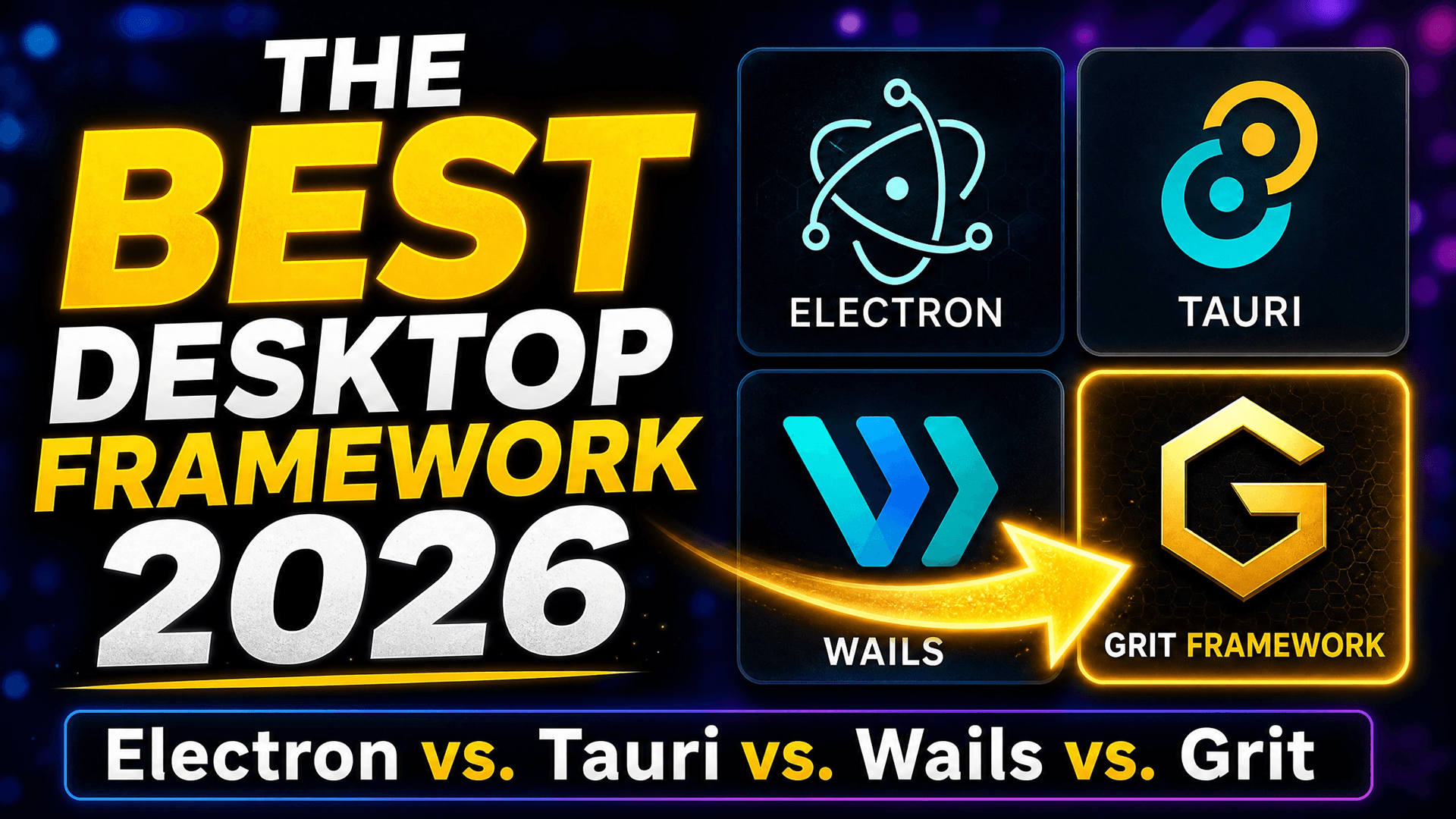
Table of Contents
- The 30-second summary
- Electron — the incumbent
- Tauri — the lean Rust challenger
- Wails — Go's quiet desktop story
- Grit Framework — Wails with batteries
- Head-to-head comparison table
- What "production-ready" actually means
- A real Grit desktop workflow
- When to pick what
- FAQs
The 30-Second Summary
- Electron — fastest to a working prototype, biggest bundle (100MB+), highest RAM (200–500MB), Node.js backend. Best when you need full Chromium parity (e.g., screen sharing, codecs).
- Tauri — tiny bundle (~5MB), Rust backend, system webview. Excellent for shipping a small utility, painful if your team isn't fluent in Rust.
- Wails — Go backend, system webview, ~10MB bundle. Best of both worlds for teams already on Go.
- Grit Framework (Desktop) — Wails under the hood, plus a production scaffold: auth, RBAC, rate limiting, observability, admin panel, code generation. You start with a working business app, not an empty webview.
Electron — The Incumbent
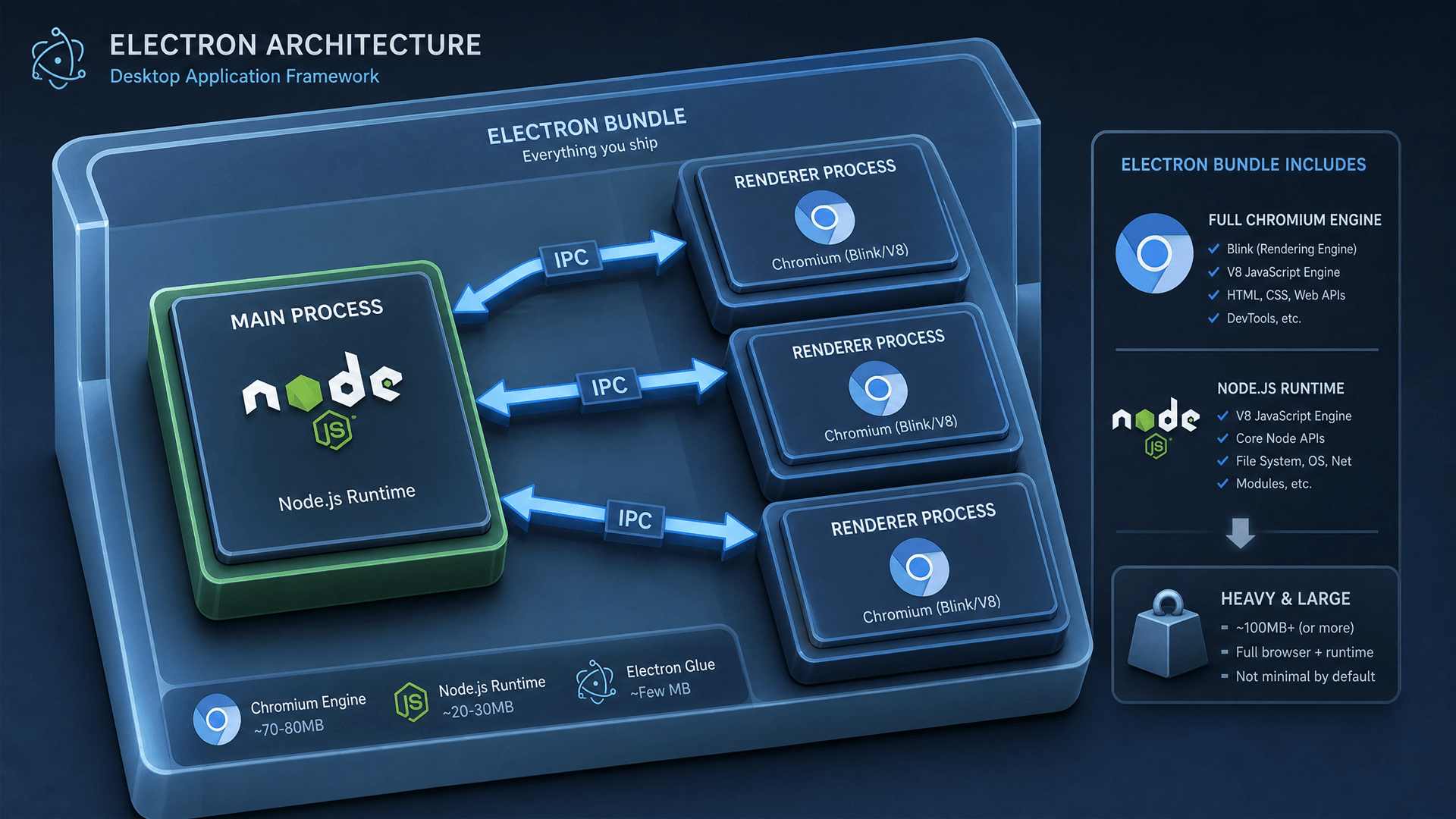
Electron bundles a full copy of Chromium and Node.js into every app. That's why VS Code, Slack, Discord and Notion all look identical on Windows, macOS and Linux — and also why they all eat your laptop's battery.
Strengths
- Largest ecosystem, every JS library Just Works
- Full Chromium feature parity (latest CSS, WebRTC, codecs)
- Mature tooling (electron-builder, electron-updater)
Weaknesses
- 100–250 MB installer
- 200–500 MB RAM per app
- Slow cold start (2–4 s)
- Node.js backend isn't a great fit for high-concurrency server logic
- You still write auth, RBAC, audit logs, admin panel from scratch
For Ugandan business software shipped over poor internet to mid-range Windows PCs, Electron's defaults are usually the wrong defaults.
Tauri — The Lean Rust Challenger
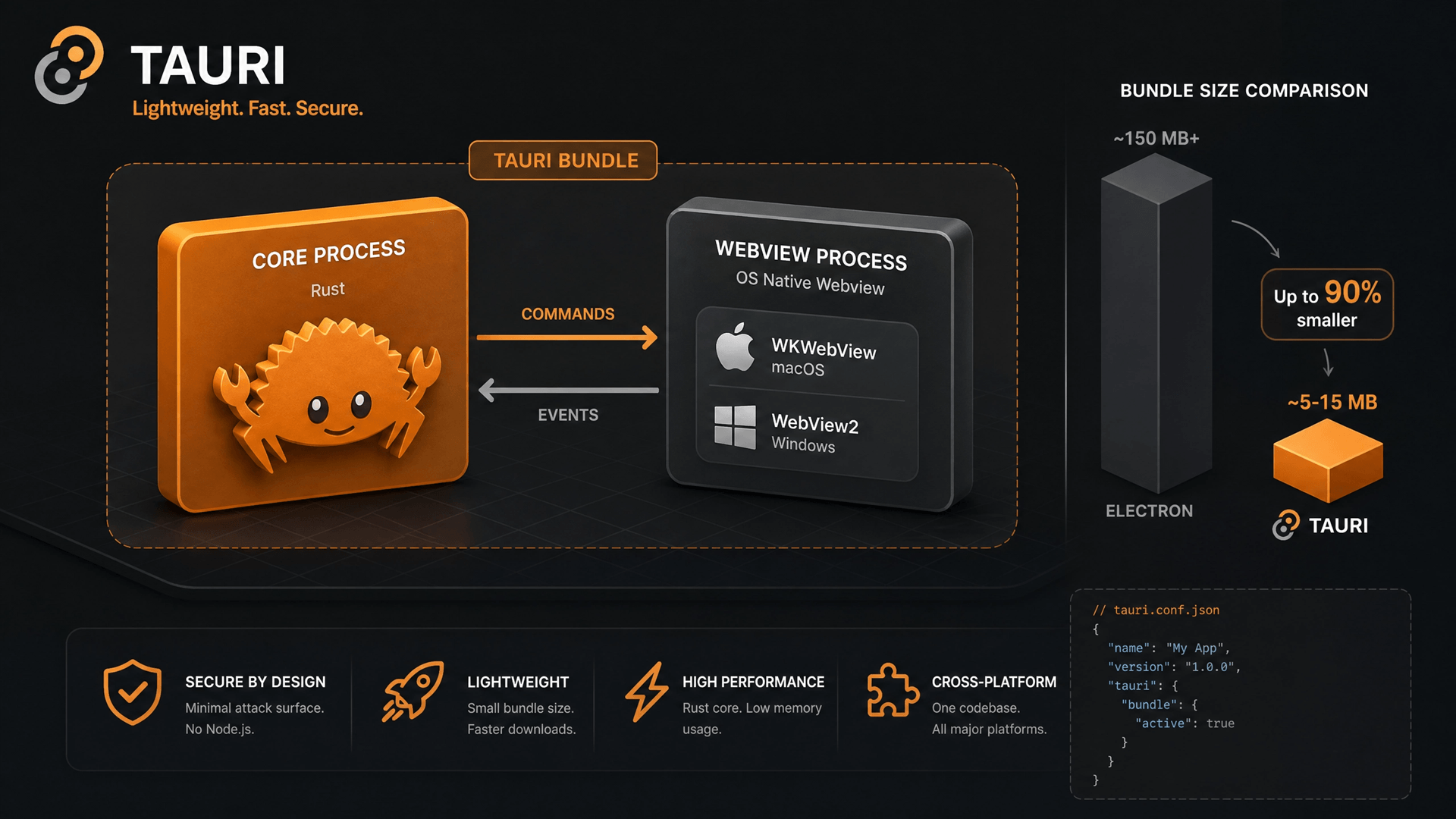
Tauri ditches bundled Chromium and uses the OS's webview (WebView2 on Windows, WebKit on macOS, WebKitGTK on Linux). The backend is Rust. The result is tiny.
Strengths
- 3–15 MB installers
- 50–150 MB RAM
- Strong security model (capabilities-based)
- Rust performance and safety
Weaknesses
- Webview differences between platforms occasionally bite
- Your team needs to know Rust — that's a steep curve for most agencies
- No scaffold for auth, RBAC, admin or observability — you build it all
- Smaller plugin ecosystem than Electron
Tauri is excellent if you have a small Rust-fluent team building a focused utility. For a 5-module ERP that needs to ship in 8 weeks, the framework speed is undone by the time it takes to build the production basics.
Wails — Go's Quiet Desktop Story
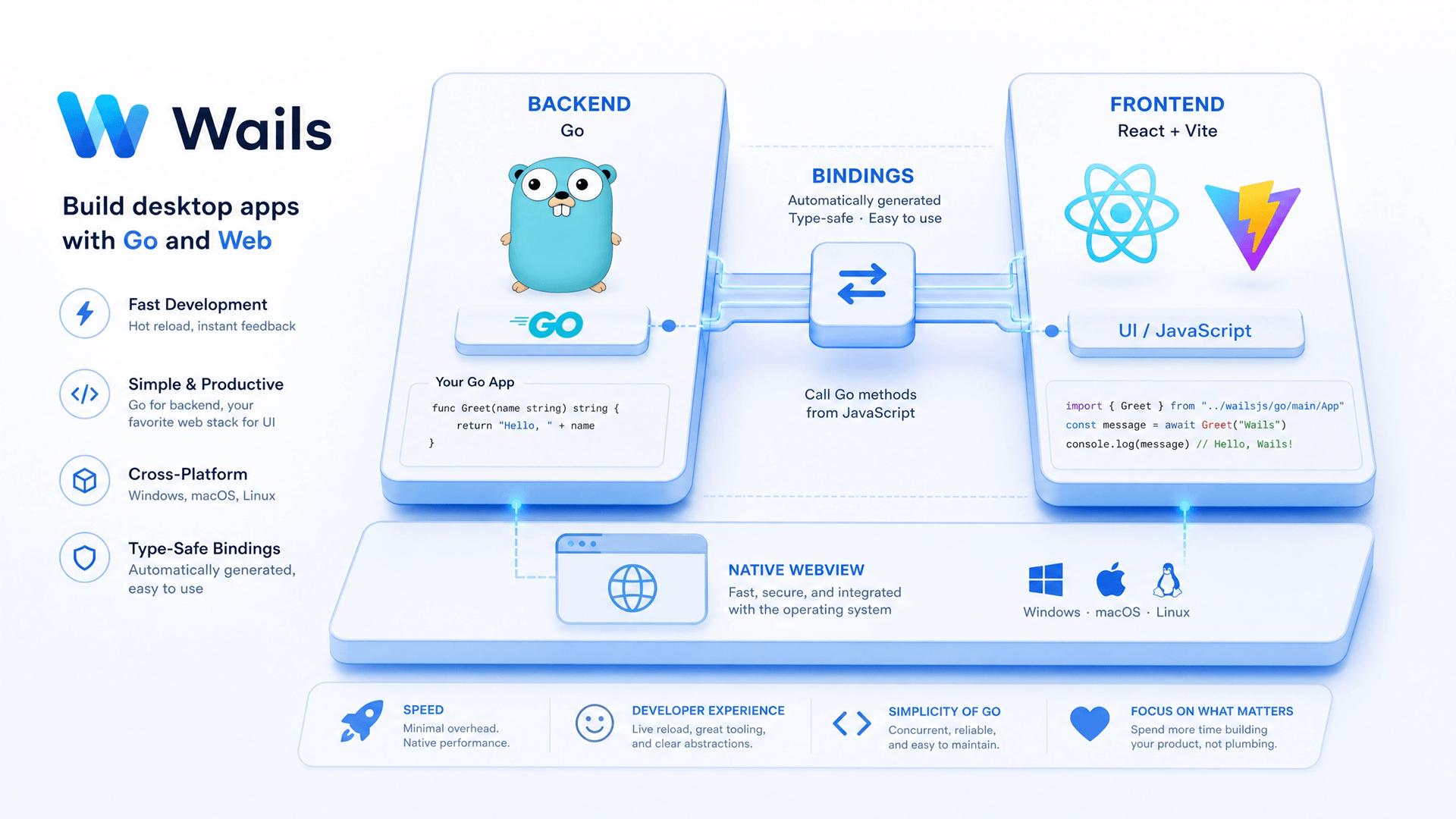
Wails does for Go what Tauri does for Rust: system webview frontend, native backend in Go. It's been quietly maturing for years and now powers a lot of internal enterprise tools.
Strengths
- 8–20 MB installers (slightly larger than Tauri because Go statically links)
- 80–150 MB RAM
- Go's concurrency model is excellent for sync engines, background jobs and hardware integration
- Single binary deployment
- Friendly developer experience (
wails devwith hot reload)
Weaknesses
- Same as Tauri: no scaffold, no admin, no auth, no observability out of the box
- Smaller ecosystem than Electron
This is where most teams stop. They pick Wails, then spend three months writing the same JWT + RBAC + audit-log + admin-panel + observability setup they wrote on the last project.
Grit Framework — Wails with Batteries
The Grit Framework builds on Wails by adding everything that production business software actually needs — and a code generator that creates new resources end-to-end.
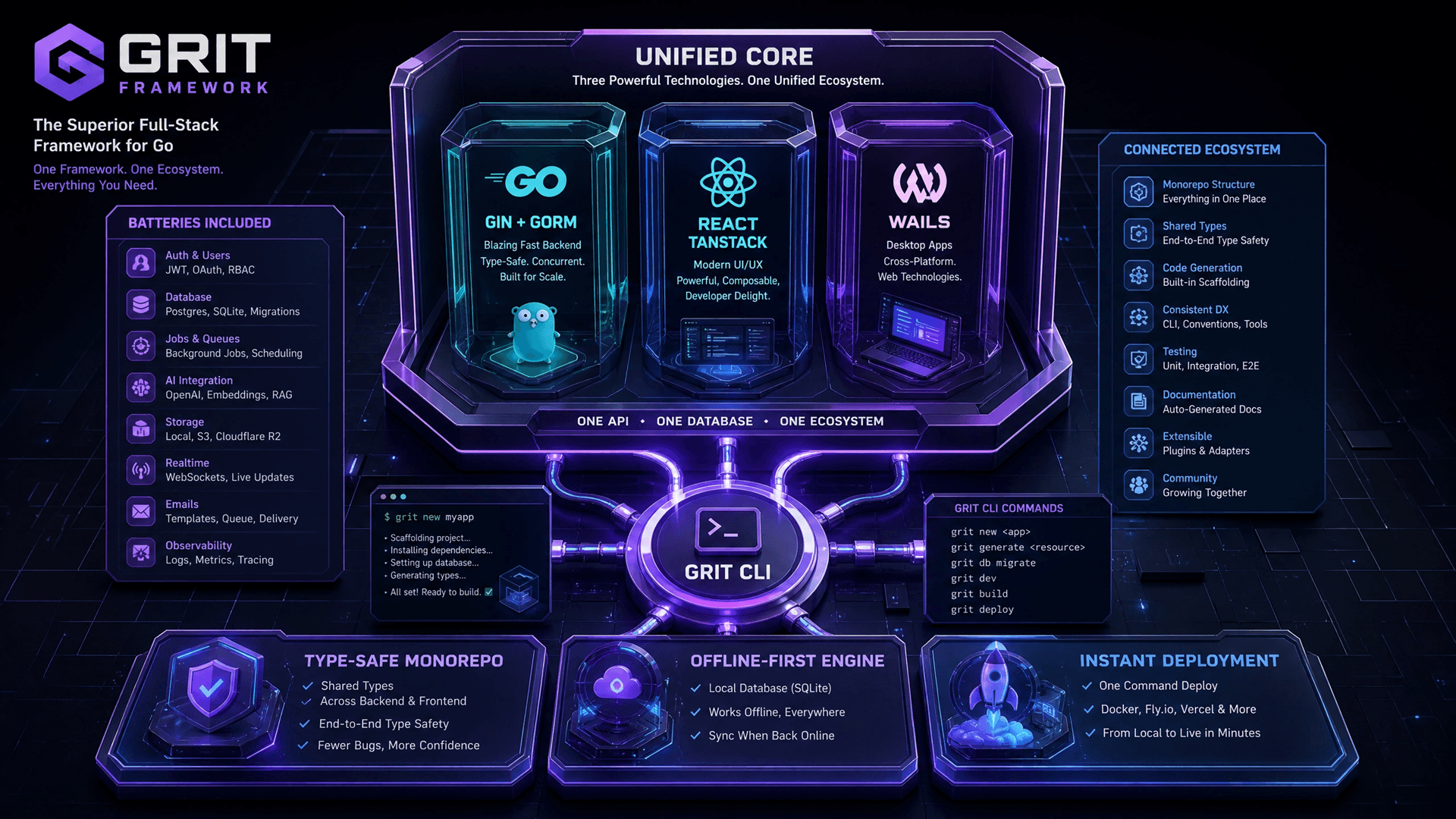
grit new my-app --architecture desktop
cd my-app
grit resource invoice  # generates Go model + service + handler + React hooks + admin page
wails dev # launches the desktop window with hot reloadWhat you get out of the box:
- Wails desktop shell — system webview, Go backend, 10–25 MB final binary
- JWT authentication wired up, login screen included
- RBAC (role-based access control) — admin, manager, staff roles configurable per resource
- Sentinel for rate limiting and abuse protection
- Pulse for observability — structured logs, traces, metrics
- Filament-style admin panel for Go — every resource gets a CRUD admin page automatically
- TanStack Router for the React frontend with type-safe file-based routing
- Connection pooling, graceful shutdown, CORS, gzip baked in
- One CLI, five architectures — desktop, full-stack web, API-only, mobile, hybrid. Your business logic ports across them with minimal rewrite.
Read the stack selector to see how the same Grit codebase can ship to a desktop binary today and a web SPA tomorrow.
Head-to-Head Comparison Table
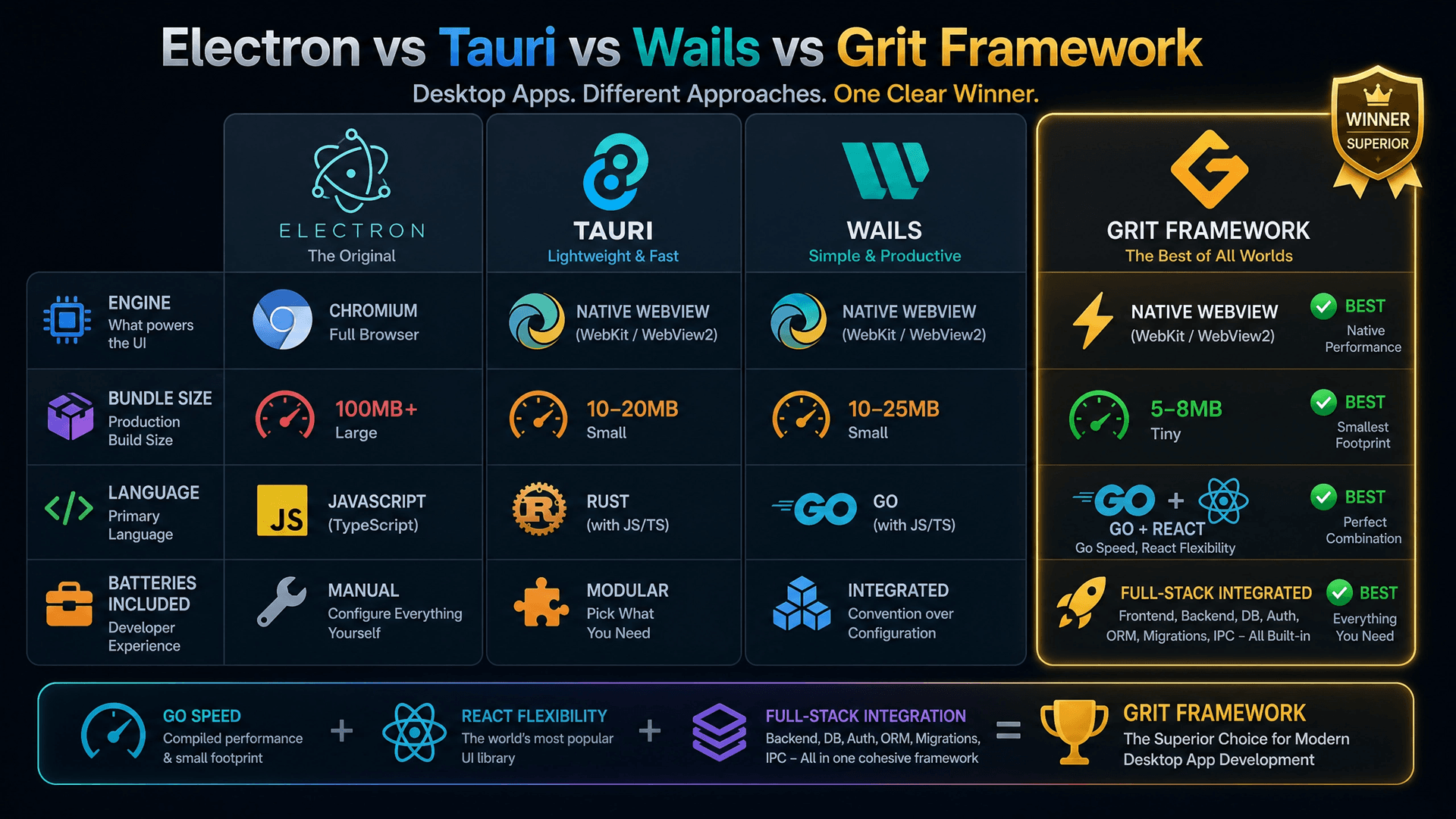
| Dimension | Electron | Tauri | Wails (raw) | Grit (Desktop) |
|---|---|---|---|---|
| Backend language | Node.js | Rust | Go | Go |
| Frontend | Any | Any | Any | React + TypeScript |
| Browser engine | Bundled Chromium | System webview | System webview | System webview |
| Installer size | 100–250 MB | 3–15 MB | 8–20 MB | 10–25 MB |
| RAM usage | 200–500 MB | 50–150 MB | 80–150 MB | 80–180 MB |
| Cold start | 2–4 s | < 1 s | < 1 s | < 1 s |
| Auth out of the box | ❌ | ❌ | ❌ | ✅ JWT + RBAC |
| Admin panel | ❌ | ❌ | ❌ | ✅ Generated |
| Observability | ❌ | ❌ | ❌ | ✅ Pulse |
| Code generator | ❌ | ❌ | Basic | ✅ Resource scaffolding |
| Rate limiting | ❌ | ❌ | ❌ | ✅ Sentinel |
| Routing solution | DIY | DIY | DIY | ✅ TanStack file-based |
| Hot reload (dev) | ✅ | ✅ | ✅ | ✅ |
| Auto-updates | ✅ electron-updater | ✅ Tauri updater | ✅ Wails updater | ✅ Wails updater |
| Hardware integration | ⚠️ via Node | ⚠️ via Rust crates | ✅ via Go | ✅ via Go |
| Multi-architecture deploy (web/mobile) | ❌ | ❌ | ❌ | ✅ |
| Team ramp time | Days | Weeks (Rust) | Days | Hours |
What "Production-Ready" Actually Means
When we say "Grit ships production-ready," here's the concrete checklist it covers from day one:
- Authenticated — JWT login, secure password hashing, refresh tokens
- Authorized — RBAC enforced at the handler layer for every resource
- Observable — every request and background job emits structured logs and traces via Pulse
- Rate-limited — Sentinel protects against abuse and runaway scripts
- Auditable — every mutation is logged with actor + timestamp
- Admin-able — non-developers can manage resources via the generated admin panel
- Documented — OpenAPI spec generated from handlers
- Crash-safe — graceful shutdown, panic recovery, persistent error reporting
You can build all of that on raw Wails or Tauri. It just takes another 6–10 weeks per project. Or you can grit resource invoice and have it scaffolded in 30 seconds.
A Real Grit Desktop Workflow
Here's an end-to-end view of how we'd build a new "Customer" resource for a desktop CRM:
# 1. Scaffold the resource
grit resource customer --fields "name:string,phone:string,email:string,location:string,credit_limit:money"

# Grit generates:
# - backend/models/customer.go           (GORM model)
# - backend/services/customer_service.go (CRUD + business logic)
# - backend/handlers/customer_handler.go (Wails-callable methods + REST routes)
# - frontend/src/hooks/useCustomer.ts    (React Query hooks)
# - frontend/src/routes/customers.tsx    (List/Create/Edit pages)
# - admin/customer.tpl                   (Admin panel CRUD)
# - migrations/2026_05_13_customers.sql  (Schema migration)

# 2. Migrate the database
grit migrate up

# 3. Start the desktop app in dev mode
wails devYou now have a fully functional Customers module with: an authenticated list view in React, RBAC-protected CRUD operations in Go, an admin panel for managing roles, and observability on every call. The same code, with grit new --architecture web, would scaffold a web app instead.
When to Pick What
| Your situation | Best pick |
|---|---|
| Building a Slack/Discord-style chat client with screen share | Electron |
| Tiny utility (file converter, system tray app) and team knows Rust | Tauri |
| Internal Go-team tool, no production scaffold needed | Wails (raw) |
| Production business software, Ugandan or African market, offline-first, sync, admin panel, RBAC required | Grit Framework |
| You want to ship the same code to web + desktop later | Grit Framework |
FAQs
1. Is Grit Framework open source? Yes — see gritframework.dev. The CLI, scaffolds and core libraries (Sentinel, Pulse) are open. Desishub maintains it actively.
2. Can I use Vue or Svelte instead of React with Grit? The official desktop architecture is React + TypeScript. The framework's resource templates target React, so swapping in another framework removes most of the productivity benefit. For new projects we strongly recommend sticking with React.
3. How does Grit handle offline-first sync? Grit Desktop apps ship with a local database (SQLite by default) and a sync worker that reconciles changes with a remote API when the network is up. The pattern is shared across all Desishub builds — see the Business Management Platform case study.
4. What about updates? Grit Desktop uses the Wails auto-updater. You publish a new build to your release channel and every installed copy upgrades silently the next time the user opens the app.
5. Why Go on the backend instead of Rust or Node? Go strikes the best balance for desktop business software: fast compile times, excellent concurrency for sync engines and background jobs, easy hardware integration via cgo, and a much shorter ramp time for new engineers than Rust.
6. Is Wails ready for production? Yes. Wails is mature, widely used, and the framework Desishub ships every desktop project on. Grit adds the production scaffold around it.
Suggested Articles
- Best Desktop App Development Company in Uganda 2026
- Inside Our Offline-First Business Management Platform
- How to Hire the Best Desktop App Developer in Uganda
- Desktop App Development: Why It Still Matters for Enterprise
- Web-Based vs Desktop Software in Uganda
- Why We Use Go for Secure ERP Systems
Talk to the Team That Built It
The Grit Framework was built by Desishub's founder JB during two years of shipping production desktop software for Ugandan businesses. If you're picking a framework for your next project, or you want a desktop app built on Grit by the team that wrote it, get in touch.